Typescript
Building safer, scalable JavaScript applications with static typing and modern language features.

#Why Typescript over Javascript ?
- Javascript is a loosely typed language.
- These are the benefits —
-
Catches bugs during development
-
Better autocomplete and IntelliSense
-
AI coding agents perform significantly better with typescript as it reduce hallucinations and logic bugs.
-
AI coding agents can run typescript compiler, read explicit error messages, and automatically fix its own mistakes.
-
Easy to catch error at compile time.
-
Easier Refactoring. Suppose you rename:
typescriptinterface User { fullName: string; } // to interface User { name: string; } // TypeScript immediately tells you every place that still uses fullName. -
Prevents incorrect function calls
typescriptfunction add(a: number, b: number) { return a + b; } add(5, 10); // ✅ add("5", 10); // ❌ Error // Without typescript add("5", 10); // "510" -
Makes code easier to maintain.
-
#What is Typescript ?
- Typescript is a programming language developed and maintained by Microsoft.
- It is strongly typed superset of JavaScript. This means that any valid JavaScript code is also valid TypeScript code, but TypeScript adds an extra layer of syntax to support static typing.
#How does typescript code run?
-
Typescript never runs on browser. Your browser can only understand javascript.
-
Typescript is transpiled down to javascript.
-
When typescript is transpiled to javascript, it perform
type checking.If there is an error, the conversion to javascript fails.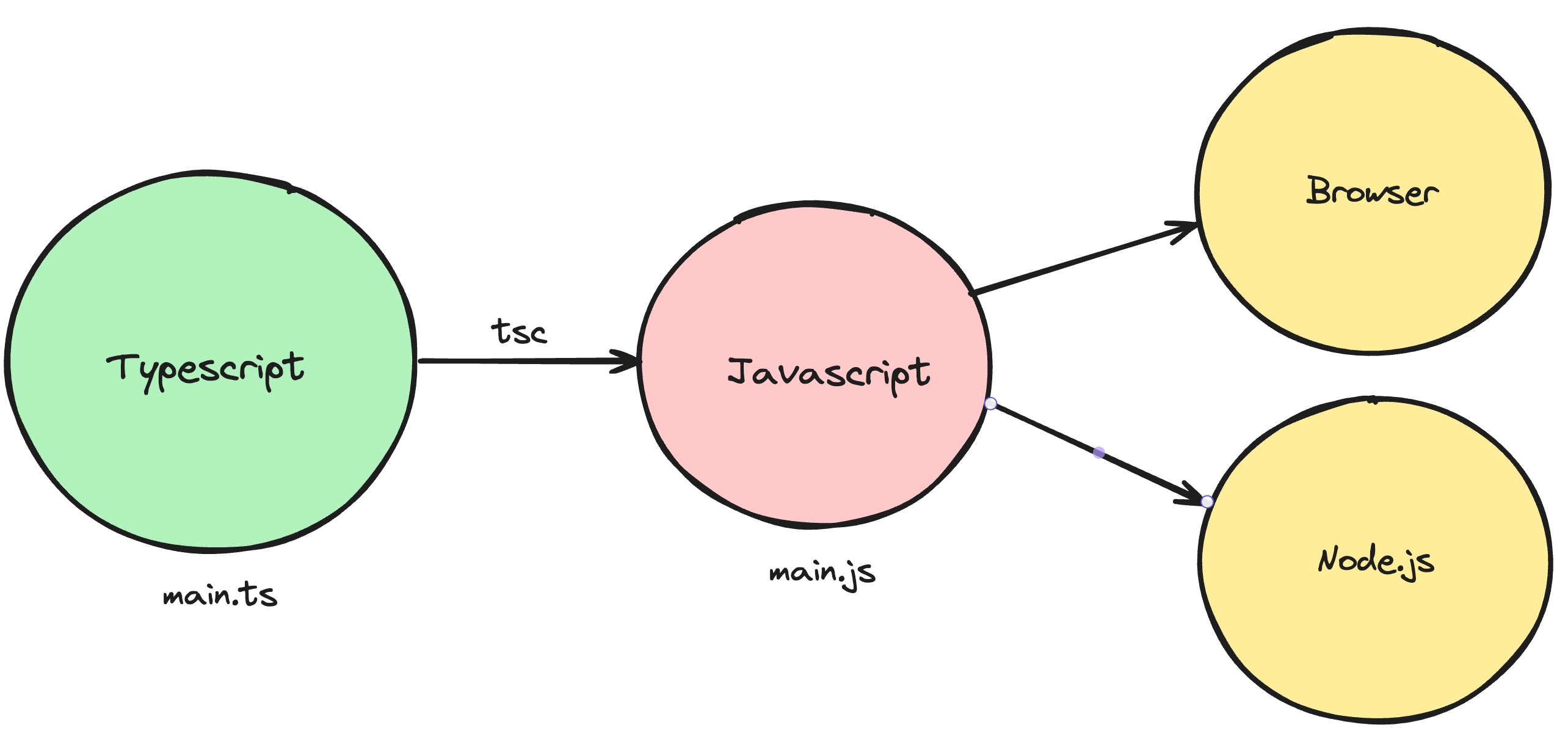
#The tsc compiler
tscis the official typescript compiler that you can use to converttypescripttojavascript- Install typescript globally using
npm install -g typescript - Use
tsc -bto compile the typescript file, it will create a corresponding javascript file.
#The tsconfig file
- It is a configuration file, which has a bunch of options that you can change to change the compilation process.
- Some of the options are:
#Target
-
The
targetoption in atsconfig.jsonfile specifies the ECMAScript target version to which the TypeScript compiler will compile the TypeScript code. -
To try it out, try compiling the following code for target being
ES5andes2020javascriptconst greet = (name: string) => `Hello, ${name}!`; //Output ES5 "use strict"; var greet = function (name) { return "Hello, ".concat(name, "!"); }; //Because at that time, arrow functions was not defined. It would be really helpful if someone want to run the application in older browser. //Output ES2020 "use strict"; const greet = (name) => `Hello, ${name}!`;
#rootDir
- It defines, where should the compiler look for
.tsfiles. Good practise is for this to be thesrcfolder
#outDir
- It defined, where should the compiler look for spit out the
.jsfiles.
#noImplicitAny
- If it’s true, the compiler won’t throw error if someone didn’t explicitly mentioned
:type
const greet = (name) => `Hello, ${name}!`;#removeComments
- Whether or not to include comments in the final
jsfile.
#Interfaces
-
Interfaces is used to assign types to the objects.
typescriptinterface User { firstName: string; lastName: string; email?: string; // ? defines optional. age: number; } function isLegal(user: User) { if (user.age > 18) { return true } else { return false; } } console.log( isLegal({ firstName: "Prem", lastName: "Deep", age: 24 }) );
#Implementing interfaces
-
Interfaces have an special property, You can implement interfaces as a class.
typescriptinterface Person { name: string; age: number; greet(phrase: string): void; } class Employee implements Person { name: string; age: number; constructor(n: string, a: number) { this.name = n; this.age = a; } greet(phrase: string) { console.log(`${phrase} ${this.name}`); } } // Create an object (instance) of Employee const employee1 = new Employee("Prem", 24); // Access properties console.log(employee1.name); // Prem console.log(employee1.age); // 24 // Call the method employee1.greet("Hello, I'm"); // Hello, I'm Prem -
This is useful since now you can create multiple
variantsof a person (Manager, CEO …)
#Types
-
Very similar to
interfaces, types let you aggregate data together.typescripttype User = { firstName: string; lastName: string; age: number } -
It provides two extra features, that is not possible with
interfaces
#1. Union
-
Let’s say you want define a variable which could be a number or a string.
typelet you do this.typescripttype StringOrNumber = string | number; function printId(id: StringOrNumber) { console.log(`ID: ${id}`); } printId(101); // ID: 101 printId("202"); // ID: 202
#2. Intersection
-
You can create a
typewhich could be the intersection of multipletypetypescripttype Employee = { name: string; startDate: Date; }; type Manager = { name: string; department: string; }; type TeamLead = Employee & Manager; const teamLead: TeamLead = { name: "prem", startDate: new Date(), department: "Software developer" }; // It would be really helpful in a different role based application, where you are provind diffent access based on role they have.
#Arrays in TS
-
If you want to define arrays in typescript, it’s as simple as adding a
[]annotation next to the type.typescriptfunction maxValue(arr: number[]) { let max = 0; for (let i = 0; i < arr.length; i++) { if (arr[i] > max) { max = arr[i] } } return max; } console.log(maxValue([1, 2, 3])); //Given a list of users, filter out the users that are legal (greater than 18 years of age) interface User { firstName: string; lastName: string; age: number; } function filteredUsers(users: User[]) { return users.filter(x => x.age >= 18); } console.log(filteredUsers([{ firstName: "harkirat", lastName: "Singh", age: 21 }, { firstName: "Raman", lastName: "Singh", age: 16 }, ]));
#enum
-
enumin typescript are a feature that allow you to define a set of named constants like — Direction (Up, Down, Left, Right). It provides a human readable way to represent a set of constant values. Also, it fastilate better suggestions for developers.typescriptenum Direction { Up, Down, Left, Right } function doSomething(keyPressed: Direction) { // do something. } doSomething(Direction.Up); // You can still define type variable with union type keyInput = "up" | "down" | "left" | "right" // But it doesn't provided the access like Direction.Up -
enumis just defined in typescript, there is no such things in javascript. So, when typescript codes are compiled, it underhood use some variable like, 0, 1, 2, 3. -
What do you think,
console.log(Direction.Up)will return?- It returns
0
- It returns
-
But, you can definitely choose what value the javascript should use under the hood.
typescriptenum Direction { Up = "UP", Down = "Down", Left = "Left", Right = 'Right' } function doSomething(keyPressed: Direction) { // do something. } doSomething(Direction.Down) console.log(Direction.Up); // Return: "UP" -
There is a very common use case of
enumin express.typescriptenum ResponseStatus { Success = 200, NotFound = 404, Error = 500 } app.get("/', (req, res) => { if (!req.query.userId) { res.status(ResponseStatus.Error).json({}) } // and so on... res.status(ResponseStatus.Success).json({}); })
#Generics
-
Let’s say you need to define a
function, which could take anstringas an argument or anumberas an argument. Whattypeof argument will you mention during defining function? -
Generics help you to define a generic data type ,
<T>. And you can assign the data type at the time of use.typescriptfunction identity<T>(arg: T){ return arg; } let output1 = identity<string>("myString"); let output2 = identity<number>(100); -
Think of generic as it give a multiple variation of the function (variation in argument data type).
#Pick
-
Pickis a built-in utility type in TypeScript that lets you create a new type by picking only specific properties from an existing type or Interface.typescriptPick<Type, Keys> // Type - The original interface or type. // Keys - The properties you want to keep. -
Example - Imagine the User table of your database:
typescriptinterface User { id: number; name: string; email: string; password: string; createdAt: Date; } // When sending data to frontend, you should not expose the password. // Instead of creating another interface: interface PublicUser { id: number; name: string; email: string; } // You can write: type PublicUser = Pick<User, "id" | "name" | "email">; -
Why Pick is important?
- You can create another interface like i mentioned in the example. But suppose you change the type of id from
stringtonumber. You must remember to update the PublicUser interface manually. But when you usePick, It updates automatically whenever User changes.
- You can create another interface like i mentioned in the example. But suppose you change the type of id from
#Partial
-
Partialis another built-in TypeScript utility type that makes every property of a type optional. -
This is especially useful for updates, where you only send the fields that have changed.
typescriptinterface User { id: number; name: string; email: string; } // Create a partial version type PartialUser = Partial<User>; // Now typescript treat it as: type PartialUser = { id?: number; name?: string; email?: string; }
#Readonly
-
The
Readonlyutility type in TypeScript is used to make all properties of a given type read-only. This means that once an object of this type is created, its properties cannot be reassigned. -
Consider an interface
Configthat represents configuration settings for an application:typescriptinterface Config { endpoint: string; apiKey: string; } const config: Readonly<Config> = { endpoint: '<https://api.example.com>', apiKey: 'abcdef123456', }; // Attempting to modify the object will result in a TypeScript error // config.apiKey = 'newkey'; // Error: Cannot assign to 'apiKey' because it is a read-only property.
#Record & Maps
-
Recordis a built-in TypeScript utility type. -
It creates an object type where:
- Every key has the same type.
- Every value has the same type.
-
Syntax:
typescriptRecord<KeyType, ValueType> -
Basic example
typescripttype Scores = Record<string, number> const scores: Scores = { Prem: 95, Rahul: 88, Amit: 91 } // Keys are string // Values are number -
Another example
typescripttype User = { age: number city: string } type Users = Record<string, User> const users: Users = { Prem: { age: 22, city: "Delhi" }, Rahul: { age: 24, city: "Mumbai" } }
#Record vs Index Signature
These two are equivalent:
typeScores=Record<string,number>typeScores= {
[key:string]:number
}Record is simply a cleaner, more readable utility type.
#Common Use Cases
- Configuration objects
- Dictionaries / Lookup tables
- Caching data by ID
- API response maps
- Feature flags
- Storing entities by their ID
#Why not just use Map?
Although both store key-value pairs, they serve different purposes.
#Use Record when:
-
You are working with plain JavaScript objects (
{}). -
Data will be serialized to JSON.
-
Keys are typically strings (or numbers/symbols).
-
You want simple object access.
typescriptscores["Prem"] scores.Prem
#Use Map when:
-
Keys can be any type (objects, functions, etc.).
-
You need methods like:
.set().get().has().delete()
-
You frequently add or remove entries.
-
You need guaranteed insertion order during iteration.
typescriptconst scores = new Map<string, number>() scores.set("Prem", 95) scores.get("Prem") scores.has("Prem")
#Exclude
-
Excludeis a built-in TypeScript utility type. -
It removes specific types from a union type.
-
Think of it as subtracting one set of types from another.
-
Syntax:
typescriptExclude<UnionType,TypesToRemove> -
Example:
typescripttype Status = "success" | "error" | "loading" type FinalStatus = Exclude<Status, "loading"> // Result type FinalStatus = "success" | "error" // Another example: type Numbers = 1 | 2 | 3 | 4 type OddNumbers = Exclude<Numbers, 2 | 4> // Result type OddNumbers = 1 | 3
#Exclude vs Omit
#Exclude
-
Works on union types.
-
Removes members from a union.
typescripttype Status = "success" | "error" | "loading" type Result = Exclude<Status, "loading">
#Omit
-
Works on object types.
-
Removes object properties.
typescripttype User = { id: number name: string age: number } type UserWithoutAge = Omit<User, "age">
#Type Inference in Zod
-
One of Zod's biggest advantages is that it automatically generates TypeScript types from your schemas.
-
You define the schema once, and TypeScript infers the corresponding type.
-
This eliminates the need to maintain separate validation schemas and interfaces.
-
Zod Validation:
typescriptimport { z } from "zod" const UserSchema = z.object({ name: z.string(), age: z.number(), }) // Generate the typescript type automatically. type User = z.infer<typeof UserSchema> // Now both validation and types come from a single source of truth. // Equivalent inferred type: type User = { name: string age: number }