Node.js
Exploring server-side JavaScript, event-driven architecture, streams, and backend development.

#General Overview
-
Node.js is an asynchronous event-driven JavaScript runtime, Node.js is designed to build scalable network applications.
-
Node.js has a lot of native modules used to do different tasks like https, file system etc.
- File system module: This is used to perform the task like reading or writing data to a file. the code for the same is below.
javascriptconst fs = require("fs"); fs.writeFile("message.txt","Hello from Node JS!", (err)=>{ if(err) throw err; console.log("The file has been saved!"); }); //Here we are writing the string "Hello from Node JS" to the file message.txt. -
npm stands for node package manager. it has a lot of public software packages that some one else has written but one can import to their project and and use that.
-
To create the npm project, steps are:
Write the below code to command line in project directory. and the proceeds to the options coming.
javascriptnpm initNow, In the index.js file write the below code to generate random superheroes names.
javascriptconst superheroes = require('superheroes'); const temp = superheroes.random(); console.log('My name is '+ temp);Always run the program with node index.js command
-
When we use ES6. then we have to add “type” : “module” in json file. The benefits of this is that, In above code instead of const superheroes = require('superheroes'); we can write import superheroes from “superheroes”;
-
VS code is created using Node.js
#HTTP Server
-
Node js can be used to make http server
-
HTTP is a protocol used to communicate frontend and backend
-
HTTP server is basically a server/backend that use http protocol to communicate.
-
HTTP server can also be thought as function, which takes some argument, process it and return the result. sometime it is said as remote procedure call (RPC)
-
Think of server as functions, where Arguments are something the client sends Rather than calling a function using its name, the client uses a URL Rather than the function body, the server does something with the request Rather than the function returning a value, the server responds with some data
-
Things client need to worry about:
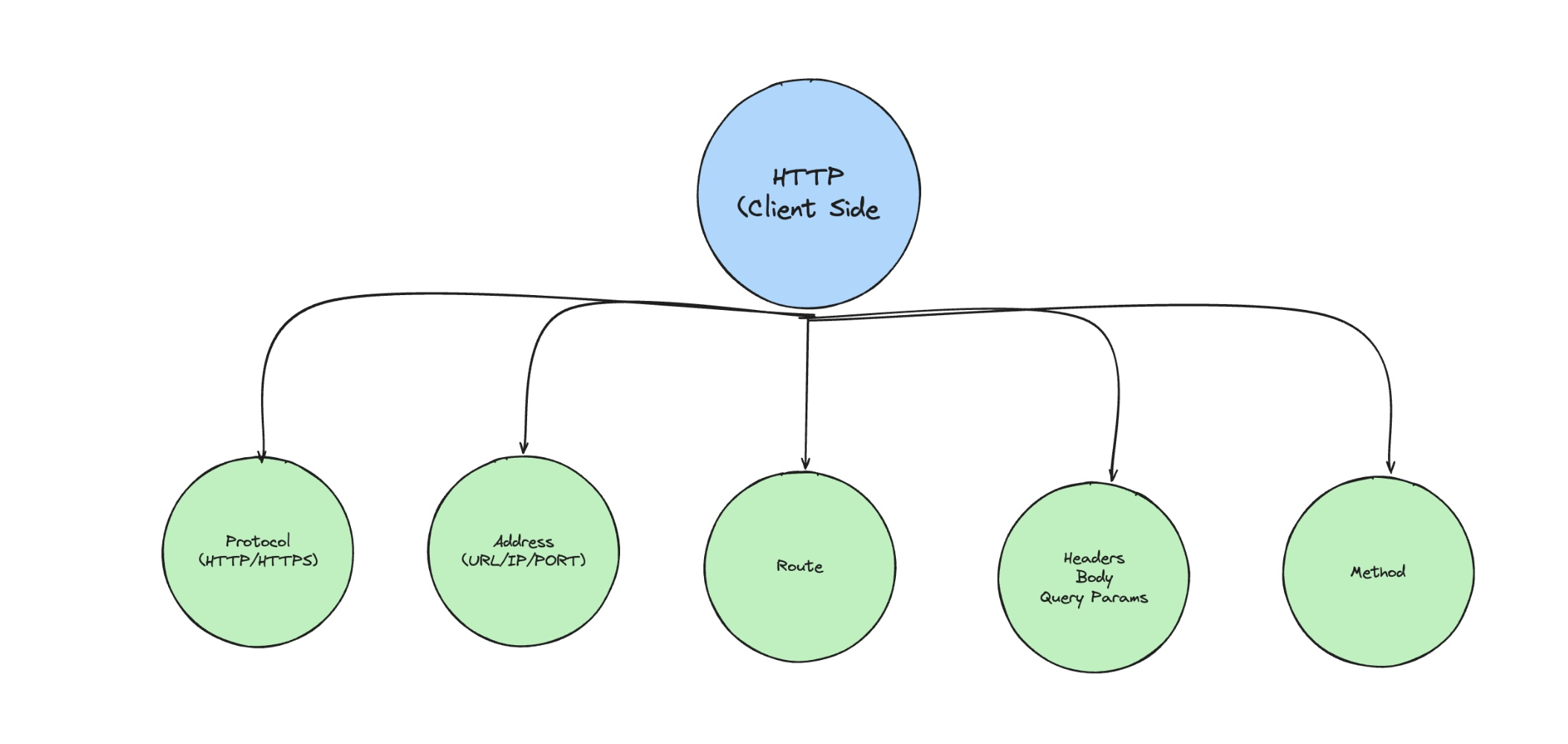
-
Things server need to worry about:
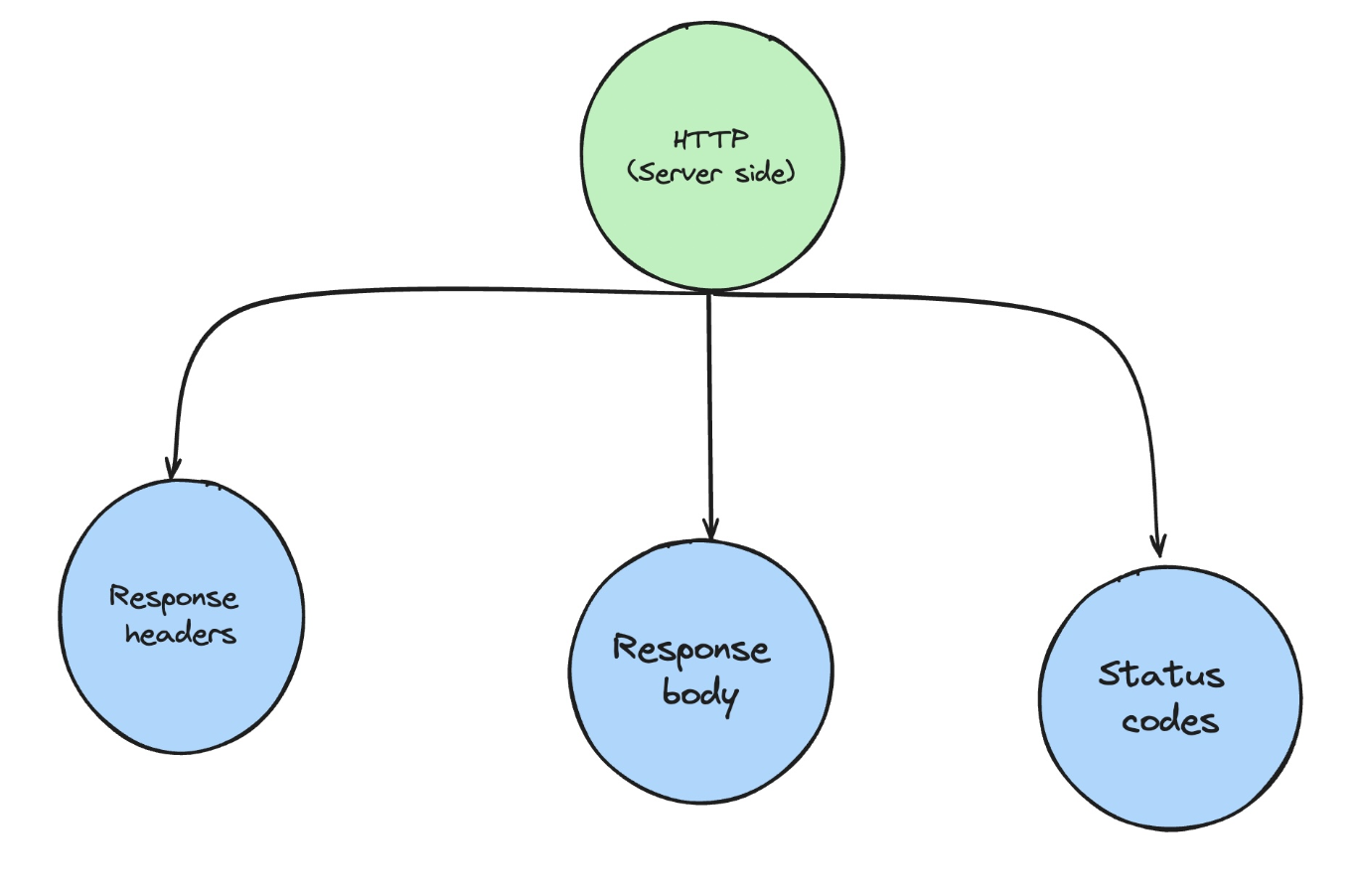
-
This is how frontend and backend communicate using http:
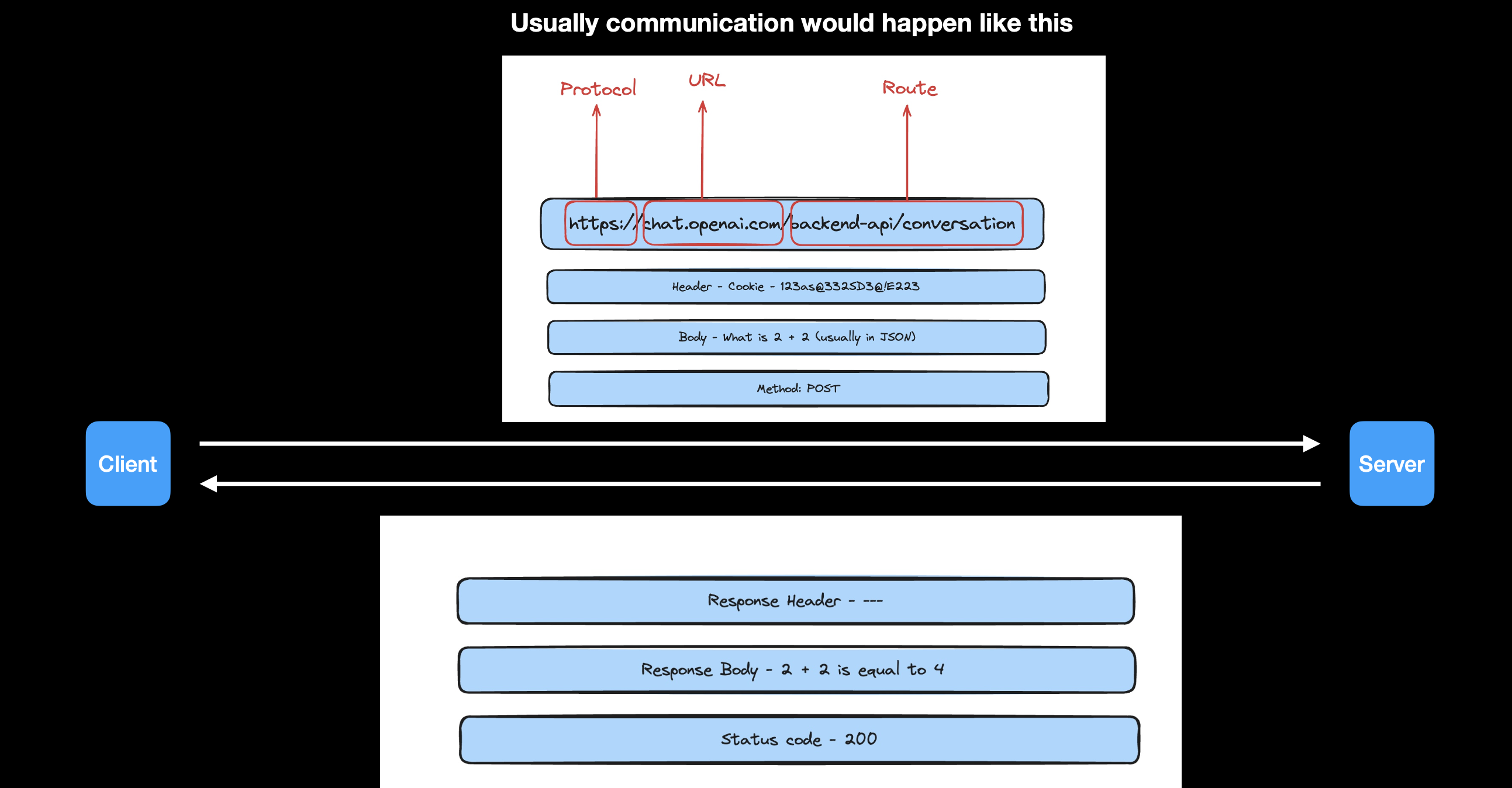
#File system
- fs.readdir() method:
-
The fs.readdir() method is used to asynchronously read the contents of a given directory.
-
The callback of this method returns an array of all the file names in the directory.
-
Syntax:
javascriptconst fs = require('fs'); fs.readdir( path, options, callback ); -
path: It holds the path of the directory from where the contents have to be read. It can be a String, Buffer or URL.
-
options: It is an object that can be used to specify optional parameters that will affect the method. It has two optional parameters:
- encoding: It is a string value which specifies which encoding would be used for the filenames given to the callback argument. The default value is ‘utf8’.
- withFileTypes: It is a boolean value which specifies whether the files would be returned as fs.Dirent objects. The default value is ‘false’.
-
callback: It is the function that would be called when the method is executed.
- err: It is an error that would be thrown if the operation fails.
- files: It is an array of String, Buffer or fs.Dirent objects that contain the files in the directory.
-
- fs.readFile() method:
-
The fs.readFile() method is an inbuilt method that is used to read the file.
-
It returns the contents/data stored in file or error if any.
-
Syntax:
javascriptconst fs = require('fs'); fs.readFile( filename, encoding, callback_function ); // Use fs.readFile() method to read the file fs.readFile('Demo.txt', 'utf8', function(err, data){ // Display the file content console.log(data); }); console.log('readFile called'); -
filename: It holds the name of the file to read or the entire path if stored at another location.
-
encoding: It holds the encoding of the file. Its default value is ‘utf8’.
-
callback_function: It is a callback function that is called after reading of file. It takes two parameters:
- err: If any error occurred.
- data: Contents of the file.
-
- fs.writeFile() method:
-
fs.writeFile() method is used to asynchronously write the specified data to a file.
-
By default, the file would be replaced if it exists.
-
Syntax:
javascriptfs.writeFile( file, data, options, callback ); let data = "This is a file containing a collection of books."; fs.writeFile("books.txt", data, (err) => { if (err) console.log(err); else { console.log("File written successfully\n"); console.log("The written has the following contents:"); console.log(fs.readFileSync("books.txt", "utf8")); } }); -
file: It is a string, Buffer, URL or file description integer that denotes the path of the file where it has to be written. Using a file descriptor will make it behave similar to fs.write() method.
-
data: It is a string, Buffer, TypedArray or DataView that will be written to the file.
-
options: It is an string or object that can be used to specify optional parameters that will affect the output. It has three optional parameter:
- encoding: It is a string value that specifies the encoding of the file. The default value is ‘utf8’.
- mode: It is an integer value that specifies the file mode. The default value is 0o666.
- flag: It is a string value that specifies the flag used while writing to the file. The default value is ‘w’.
-
callback: It is the function that would be called when the method is executed.
- err: It is an error that would be thrown if the operation fails.
-
#Path module of Node.js
-
The Node.js
pathmodule provides utilities for working with file and directory paths. -
Some important functions of the
pathmodule are below:path.join([...paths])-
Combines multiple path segments into a single path.
-
Syntax:
javascriptconst path = require('path'); const fullPath = path.join(__dirname, 'folder', 'file.txt'); // Result: '/path/to/current/directory/folder/file.txt'
-