Prisma (ORM)
Simplifying database access in Node.js with type-safe queries, schema modeling, migrations, and an intuitive developer experience.

#What are ORMs?
-
An ORM (Object-Relational Mapper) is a tool that lets you interact with a database using the programming language you're writing, instead of writing SQL for every database operation.
-
Think of an ORM as a translator between your application and the database.
#What is Prisma?
-
Prisma is a modern Object-Relational Mapper (ORM) for Node.js and TypeScript that makes it easier and safer to work with databases. Instead of writing raw SQL for every operation, you interact with your database using a type-safe API generated from your schema.
-
It facilitate us with simpler syntax.
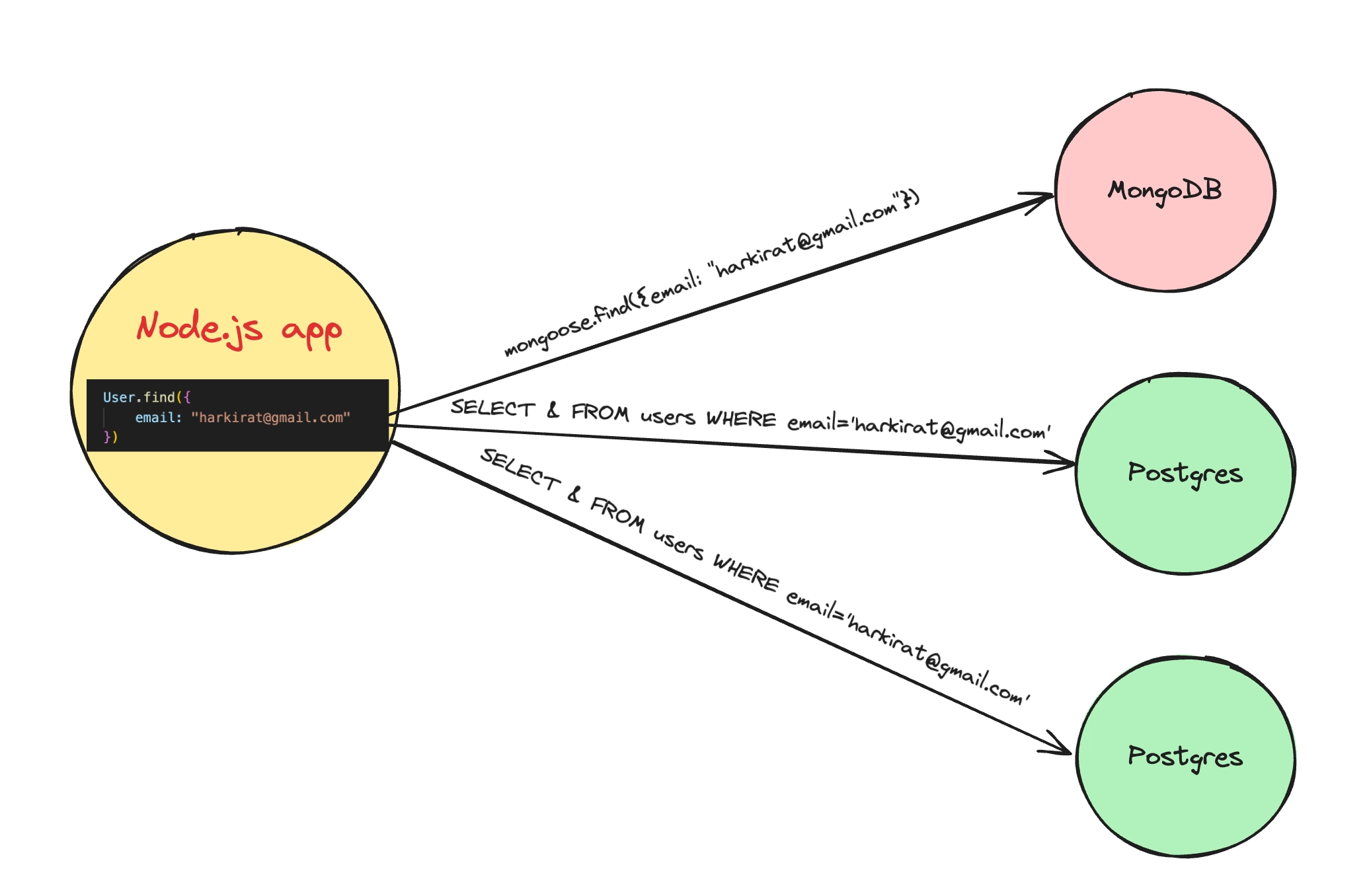
javascript// Without ORM const query = 'SELECT * FROM users WHERE email = $1'; const result = await client.query(query, ["prem@gmail.com"]); //With ORM User.find({ email: "prem@gmail.com" }) -
It lets you flip the database you are using. As it provides a unified API irrespective of the DB.
-
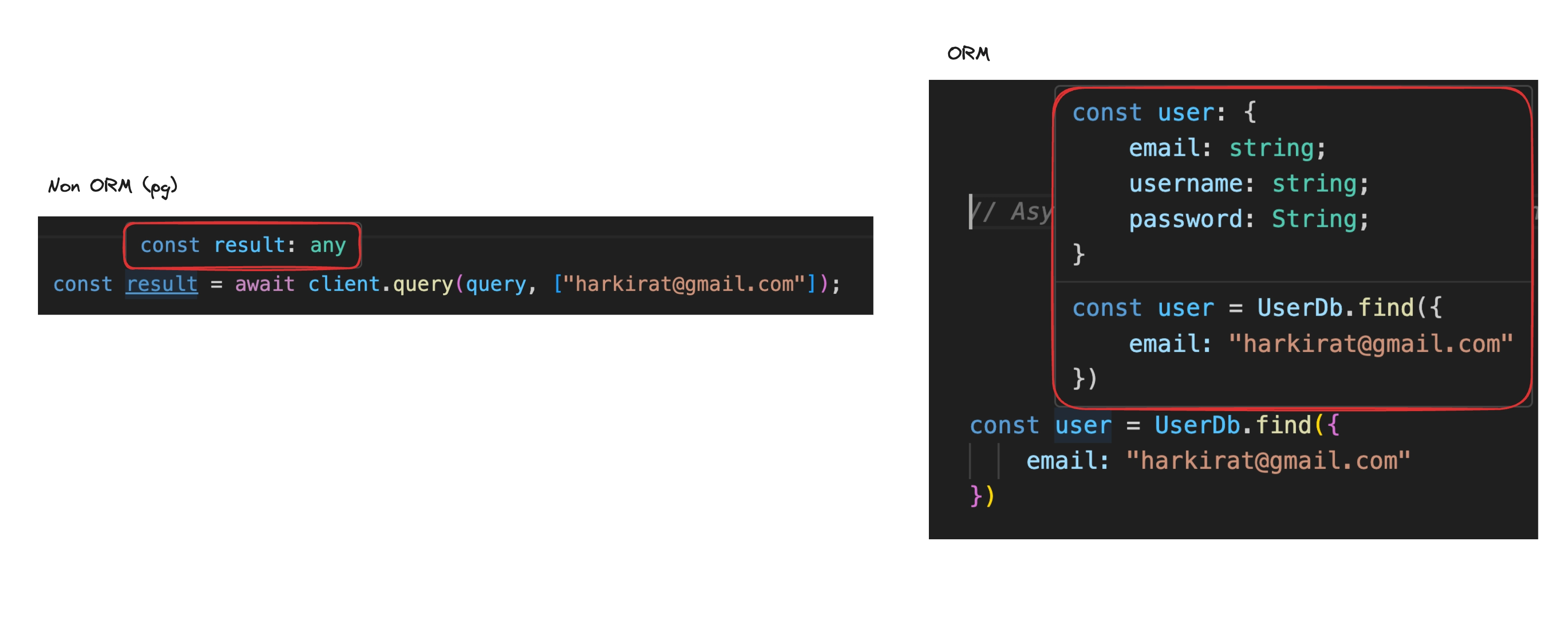
It provides type safety/ Auto completion
-
It also provides automatic migration.
- In case of a simple Postgres app, it’s very hard to keep track of all the commands that were ran that led to the current schema of the table.
- As your app grows, you will have a lot of
CREATEandALTERcommands for changing the schema of the application. Prisma maintains all of these for you. - Prisma generates and runs database migrations based on changes to the Prisma schema.
#Installing Prisma in Node Application
# Intialise an empty node js project

npm init -y

# Add dependencies

npm install prisma typescript ts-node @types/node --save-dev

# Initialise typescript

npx tsc --init
Change `rootDit` to `src`
Change `outDir` to `dist`

# Initialise a fresh prisma project

npx prisma init#schema.prisma file
-
This is the file which help Prisma to know, what your database looks like.
-
Think of this as a blueprint, which prisma reads and
- Create table
- Generate typescript type
- Generate the prisma client
- Understand relationships between tables
-
A typical
schema.prismafilejavascript// Generator generator client { provider = "prisma-client-js" } // Datasource datasource db { provider = "postgresql" url = env("DATABASE_URL") } //Models model User { id Int @id @default(autoincrement()) name String email String @unique age Int? createdAt DateTime @default(now()) }
#Generator
-
If prisma understands your schema, how can your Node.js code use it?
That's exactly what the generator does. It generates a Prisma Client, which is a JavaScript/TypeScript library you import into your app by running
npx prisma generate -
Now you can write
javascriptconst prisma = new PrismaClient() const users = await prisma.user.findMany()
#Datasource
- This tells prisma:
- Which database you are using
- How to connect to it
#Models
-
A model in
schema.prismarepresents a table in the database. -
Each field inside the model represents a column in that table.
-
Prisma uses models to:
- Create database tables (via migrations).
- Generate TypeScript types.
- Generate type-safe CRUD methods in the Prisma Client.
-
Example:
javascriptmodel User { id Int @id @default(autoincrement()) name String email String @unique age Int? createdAt DateTime @default(now()) } -
Field Types
Int→ IntegerString→ Text/VARCHARBoolean→ BooleanFloat→ Floating-point numberDateTime→ Date and timeJson→ JSON objectBytes→ Binary dataDecimal→ Precise decimal number
-
Field Attributes
@id→ Marks the field as the Primary Key.@default(value)→ Assigns a default value if none is provided.@default(autoincrement())→ Auto-incrementing integer ID.@default(now())→ Current timestamp.
@unique→ Ensures all values in the column are unique.?(Optional Marker) → Makes the field nullable (can storeNULL).
#Prisma Migration
-
A migration is a version-controlled set of SQL changes that updates your database schema.
-
Prisma generates migration files by comparing your
schema.prismawith the current database. -
Migrations keep your database schema in sync with your Prisma models.
-
Bash command to perform migration:
bashnpx prisma migrate dev --name "FirstMigration" -
What happens when you run the above command?
- Prisma compares
schema.prismawith the current database schema. - Generates SQL migration files in the
prisma/migrations/directory. - Applies the migration to your local database.
- Updates Prisma's migration history.
- Regenerates the Prisma Client to match the latest schema.
- Prisma compares
#Prisma Client
- Prisma Client is an auto-generated, type-safe database client.
- It is generated from your
schema.prismafile. - It allows you to interact with your database using JavaScript/TypeScript instead of writing raw SQL.
#Why is it auto-generated?
-
Prisma reads your
schema.prismafile. -
Based on the models, it generates:
- TypeScript types.
- CRUD methods for each model.
- Auto-completion and type safety in your editor.
-
Code to add a row in user table:
typescriptimport { PrismaClient } from "@prisma/client"; const prisma = new PrismaClient(); async function insertUser(username: string, password: string, firstName: string, lastName: string) { const res = await prisma.user.create({ data: { username, password, firstName, lastName } }) console.log(res); } insertUser("admin1", "123456", "prem", "deep")
#Relationship in Prisma
- Relationships define how two or more models are connected.
- They represent relationships between tables in a relational database using foreign keys.
- Prisma uses the
@relationattribute to define these relationships. - Prisma supports:
- One-to-One (1:1)
- One-to-Many (1:N)
- Many-to-Many (M:N)
- No foreign key fields are needed in the models for this implicit relationship.
- Prisma automatically creates a join table behind the scenes (implicit many-to-many).
#Understanding @relation
author User @relation(fields: [userId], references: [id])Meaning:
fields: [userId]- Specifies the foreign key field in the current model.
references: [id]- Specifies which field in the related model the foreign key points to.
#Example of relating the todo and user
// This is your Prisma schema file,
// learn more about it in the docs: https://pris.ly/d/prisma-schema

generator client {
  provider = "prisma-client-js"
}

datasource db {
  provider = "postgresql"
  url      = "postgresql://postgres:mysecretpassword@localhost:5432/postgres"
}

model User {
  id         Int      @id @default(autoincrement())
  username   String   @unique
  password   String
  firstName  String
  lastName   String
  todos      Todo[]
}

model Todo {
  id          Int     @id @default(autoincrement())
  title       String
  description String
  done        Boolean @default(false)
  userId      Int
  user        User    @relation(fields: [userId], references: [id])
}