PostgreSQL
Integrating PostgreSQL with Node.js to build reliable, performant applications using relational data, transactions, and efficient queries.

#Why SQL database?
-
If your application has structured data and strong consistency requirement, SQL database is a better choice.
-
It enforce a pre defined schema which ensures data consistency, fewer bugs. And all these happens at database level, not the backend level.
-
It is very useful when your data is interconnected, you can join them easily. While in noSQL database like mongoDB, you often have to embed data, duplicate data or perform multiple queries or use aggregation pipelines.
-
It has a powerful querying system. So, if you want to do a complex analytics, SQL shines.
-
It helps to enforce constraints such as primary keys, foreign keys, unique constraints, check constraints, not null constraints at database level.
-
ACID Transaction — one of the biggest reasons relational databases are trusted for applications like banking, payments, inventory management. It ensures that
a group of database operationseither completes safely or rollback. -
A good example of ACID transaction: Suppose you are booking the last available seat, three operations must happen together.
- Mark the seat as booked.
- Charge the customer credit card.
- Generate the booking confirmation.
-
Without ACID, you could end up in the situation like:
- Payment succeeds, but no seat is reserved.
- Seat is reserved, but payment fails.
- Two customers receive the same seat.
-
With ACID transaction:
plainBEGIN Reserve seat Charge payment Create booking COMMIT
#Database running lifecycle
- Running the database.
- Using a library that let’s you connect and put data in it.
- Creating a table and defining it’s
schema. - Run queries on the database to interact with the data (Insert/Update/Delete).
- Update the
schemaas your application changes and performmigrations.
#Different ways to start a postgreSQL database
-
Install PostgreSQL directly on your machine (Local Installation)
-
This installs postgreSQL as a system service
bashbrew install postgresql brew services start postgresql
-
-
Run PostgreSQL with Docker
-
Instead of installing PostgreSQL on your system, you run it inside a container.
bashdocker run \ --name postgres-db \ -e POSTGRES_USER=prem \ -e POSTGRES_PASSWORD=password \ -e POSTGRES_DB=mydb \ -p 5432:5432 \ -d postgres:17 # stop the database docker stop postgres-db # start it again docker start postgres-db
-
-
Run PostgreSQL with Docker Compose
- This is the preferred option when your project has multiple services (backend, database, Redis, etc.).
-
Use a managed cloud postgreSQL service
- Instead of running PostgreSQL yourself, a cloud provider manages it for you.
- Some of the services are — Neon, Supabase, AWS, GCP, Azure
#Library that let’s you connect and put data in database
psql— It is a terminal-based front-end to PostgreSQL. It provides an interactive command-line interface to the PostgreSQL database. Withpsql, you can type in queries interactively, issue them to PostgreSQL, and see the query results.- It comes bundled with postgreSQL which you install postgreSQL directly in your machine.
pg— It is aNode.jslibrary that you can use in your backend app to store data in the Postgres DB (similar tomongoose).
#How to create a table and define its schema
-
To create a table with a specific schema, the command to run is —
sqlCREATE TABLE users ( id SERIAL PRIMARY KEY, username VARCHAR(50) UNIQUE NOT NULL, email VARCHAR(255) UNIQUE NOT NULL, password VARCHAR(255) NOT NULL, created_at TIMESTAMP WITH TIME ZONE DEFAULT CURRENT_TIMESTAMP );
There are a few parts of this SQL statement, let’s decode them one by one
-
CREATE TABLE users
CREATE TABLE users: This command initiates the creation of a new table in the database namedusers.
-
id SERIAL PRIMARY KEY
id: The name of the first column in theuserstable, typically used as a unique identifier for each row (user). Similar to_idin mongodbSERIAL: A PostgreSQL-specific data type for creating an auto-incrementing integer. Every time a new row is inserted, this value automatically increments, ensuring each user has a uniqueid.PRIMARY KEY: This constraint specifies that theidcolumn is the primary key for the table, meaning it uniquely identifies each row. Values in this column must be unique and not null.
-
email VARCHAR(255) UNIQUE NOT NULL,
email: The name of the second column, intended to store the user's username.VARCHAR(50): A variable character string data type that can store up to 50 characters. It's used here to limit the length of the username.UNIQUE: This constraint ensures that all values in theusernamecolumn are unique across the table. No two users can have the same username.NOT NULL: This constraint prevents null values from being inserted into theusernamecolumn. Every row must have a username value.
-
password VARCHAR(255) NOT NULL
Same as above, can be non unique
-
created_at TIMESTAMP WITH TIME ZONE DEFAULT CURRENT_TIMESTAMP
created_at: The name of the fifth column, intended to store the timestamp when the user was created.TIMESTAMP WITH TIME ZONE: This data type stores both a timestamp and a time zone, allowing for the precise tracking of when an event occurred, regardless of the user's or server's time zone.DEFAULT CURRENT_TIMESTAMP: This default value automatically sets thecreated_atcolumn to the date and time at which the row is inserted into the table, using the current timestamp of the database server.
💡 To know more about
SQLsyntax, read outSQLnotes.
#How to interact with the database
There are 4 things you’d like to do with a database
-
INSERT
sqlINSERT INTO users (username, email, password) VALUES ('username_here', 'user@example.com', 'user_password'); -- Notice how you didn’t have to specify the id because it auto increments -
UPDATE
sqlUPDATE users SET password = 'new_password' WHERE email = 'user@example.com'; -
DELETE
sqlDELETE FROM users WHERE id = 1; -
SELECT
sqlSELECT * FROM users WHERE id = 1;
#The pg library
-
postgreSQL exposes a protocol that allow us to send these commands (update, delete) to the database if we want to talk to the database.
-
psqlis one such library that takes commands from your terminal and sends it over to the database. -
To do the same in a Node.js application, you can use the library,
pg -
The code to connect with the database using
pgjavascriptimport { Client } from 'pg' const client = new Client({ host: 'my.database-server.com', port: 5334, database: 'database-name', user: 'database-user', password: 'secretpassword!!', }) client.connect() // The way to query const result = await client.query('SELECT * FROM USERS;') console.log(result); -
How to write a function that create a users table in your database.
javascriptimport { Client } from 'pg' const client = new Client({ connectionString: "postgresql://postgres:mysecretpassword@localhost/postgres" }) async function createUsersTable() { await client.connect() const result = await client.query(` CREATE TABLE users ( id SERIAL PRIMARY KEY, username VARCHAR(50) UNIQUE NOT NULL, email VARCHAR(255) UNIQUE NOT NULL, password VARCHAR(255) NOT NULL, created_at TIMESTAMP WITH TIME ZONE DEFAULT CURRENT_TIMESTAMP ); `) console.log(result) } createUsersTable();
#How to insert data into a table
-
Make it
asyncand make sureclient.connect()resolves before you do the insert.javascriptimport { Client } from 'pg'; // Async function to insert data into a table async function insertData() { const client = new Client({ host: 'localhost', port: 5432, database: 'postgres', user: 'postgres', password: 'mysecretpassword', }); try { await client.connect(); // Ensure client connection is established const insertQuery = "INSERT INTO users (username, email, password) VALUES ('username2', 'user3@example.com', 'user_password');"; const res = await client.query(insertQuery); console.log('Insertion success:', res); // Output insertion result } catch (err) { console.error('Error during the insertion:', err); } finally { await client.end(); // Close the client connection } } insertData(); // This is an insecure way to store data in your tables. // Writing insertQuery in this way can cause SQL INJECTION. // Someone can do an SQL INJECTION to get access to your data/delete your data.
#SQL Injection
-
In your application, this insert query will be done when a user signs up on your app. Email, username, password are all user provided strings.
-
So, you must not put the user provided strings in the
SQL stringjavascriptSQL string = "INSERT INTO users (username, email, password) VALUES ('username2', 'user3@example.com', 'user_password');" -
If you do so, the user may send
“DELETE * FROM USERS”at the place of“username2”and this will delete all the users from user table. This is call SQL Injection. -
The better way to write is:
javascriptimport { Client } from 'pg'; // Async function to insert data into a table async function insertData(username: string, email: string, password: string) { const client = new Client({ host: 'localhost', port: 5432, database: 'postgres', user: 'postgres', password: 'mysecretpassword', }); try { await client.connect(); // Ensure client connection is established // Use parameterized query to prevent SQL injection const insertQuery = "INSERT INTO users (username, email, password) VALUES ($1, $2, $3)"; const values = [username, email, password]; const res = await client.query(insertQuery, values); console.log('Insertion success:', res); // Output insertion result } catch (err) { console.error('Error during the insertion:', err); } finally { await client.end(); // Close the client connection } } // Example usage insertData('username5', 'user5@example.com', 'user_password').catch(console.error);
#Relationship in SQL
-
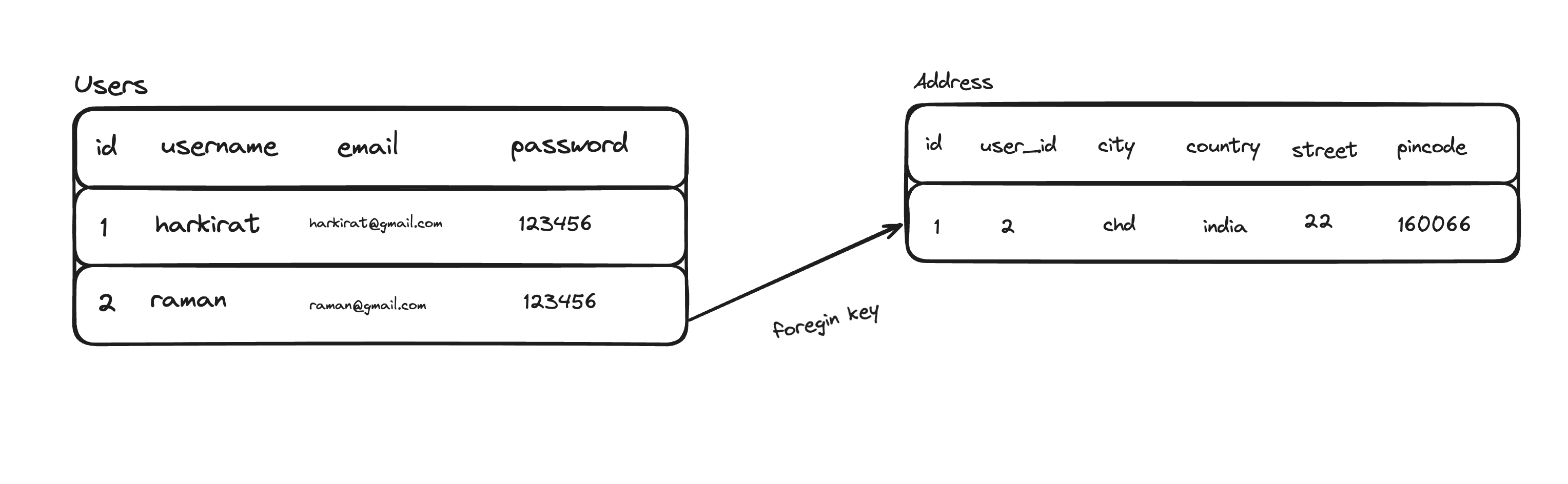
Relationship lets you store data in different table and relate it with each other.
-
When defining table, you need to define the relationship.
sqlCREATE TABLE users ( id SERIAL PRIMARY KEY, username VARCHAR(50) UNIQUE NOT NULL, email VARCHAR(255) UNIQUE NOT NULL, password VARCHAR(255) NOT NULL, created_at TIMESTAMP WITH TIME ZONE DEFAULT CURRENT_TIMESTAMP ); CREATE TABLE addresses ( id SERIAL PRIMARY KEY, user_id INTEGER NOT NULL, city VARCHAR(100) NOT NULL, country VARCHAR(100) NOT NULL, street VARCHAR(255) NOT NULL, pincode VARCHAR(20), created_at TIMESTAMP WITH TIME ZONE DEFAULT CURRENT_TIMESTAMP, FOREIGN KEY (user_id) REFERENCES users(id) ON DELETE CASCADE ); -- How to insert the address of a user? INSERT INTO addresses (user_id, city, country, street, pincode) VALUES (1, 'New York', 'USA', '123 Broadway St', '10001'); -- How to get the address of a given user wih an id 1 ? SELECT city, country, street, pincode FROM addresses WHERE user_id = 1;
#Transaction in SQL
-
A transaction is a sequence of one or more SQL operations that are executed as a single unit of work.
-
Transactions ensure that database changes are made reliably and consistently.
-
For example, when transferring money between bank accounts:
- Deduct $100 from Account A.
- Add $100 to Account B.
Both operations must succeed together. If one fails, neither should be applied.
sqlBEGIN; -- Start Transaction UPDATE accounts SET balance = balance - 100 WHERE account_id = 1; UPDATE accounts SET balance = balance + 100 WHERE account_id = 2; COMMIT; -- If an error occurs befor COMMIT, you can execute ROLLBACK;
#Joins in SQL
-
A JOIN combines rows from two or more tables based on a related column. It allows you to retrieve data that is spread across multiple tables.
-
Let’s say, you need to fetch a user details and his address, what SQL query would you write?
sql-- [Bad Approach] -- Query 1: Fetch user's details SELECT id, username, email FROM users WHERE id = YOUR_USER_ID; -- Query 2: Fetch user's address SELECT city, country, street, pincode FROM addresses WHERE user_id = YOUR_USER_ID; -- [Good Approach] SELECT u.id, u.username, u.email, a.city, a.country, a.street, a.pincode FROM users u JOIN addresses a ON u.id = a.user_id WHERE u.id = YOUR_USER_ID; -
Code for the node.js application for the same problem statement.
javascriptimport { Client } from 'pg'; // Async function to fetch user data and their address together async function getUserDetailsWithAddress(userId: string) { const client = new Client({ host: 'localhost', port: 5432, database: 'postgres', user: 'postgres', password: 'mysecretpassword', }); try { await client.connect(); const query = ` SELECT u.id, u.username, u.email, a.city, a.country, a.street, a.pincode FROM users u JOIN addresses a ON u.id = a.user_id WHERE u.id = $1 `; const result = await client.query(query, [userId]); if (result.rows.length > 0) { console.log('User and address found:', result.rows[0]); return result.rows[0]; } else { console.log('No user or address found with the given ID.'); return null; } } catch (err) { console.error('Error during fetching user and address:', err); throw err; } finally { await client.end(); } } getUserDetailsWithAddress("1");
#Benefits of using JOIN
- Reduced latency - fewer database call
- SImplified application logic
- Database is optimized for joining - they use indexes, hash join, merge join, query optimizers under the hood for an efficient joining.
- Better Aggregation
- and many more.
💡 To Learn more about JOIN, I would urge you to read the
JOIN in SQLsection fromSQL Notes.
💡
SQL Notescontains much more concepts of SQL, you can deep dive there.