React.js
Creating modern, component-driven user interfaces with React fundamentals and advanced patterns.

#Convention:
- Always name the jsx file with camel case and start with capital letter. Ex: CreateTodo.jsx
#General:
- A jsx file is basically a javascript file, inside which you can write both JS and xml(not html).
#What does react do?
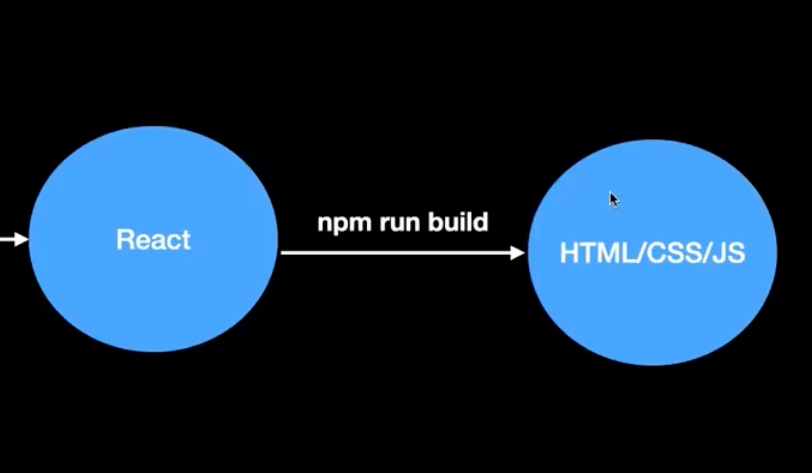
#Why do you need React?
- For dynamic websites, these libraries make it easier to do DOM manipulation.
- jquery is one of the library that tried to make dom manipulation easier.
- Under the hood, the react compiler convert your code to HTML/CSS/JS
#How to Create React app?
-
Firstly make sure that Node.js and npm is installed properly.
-
Write the below prompt in terminal to create the react app
plainnpm create-react-app my-app or, npx create-react-app my-app This will create the react app and install all the dependencies raquired. //Using vite npm create vite@latest
#Understanding State, Components and Re-rendering
-
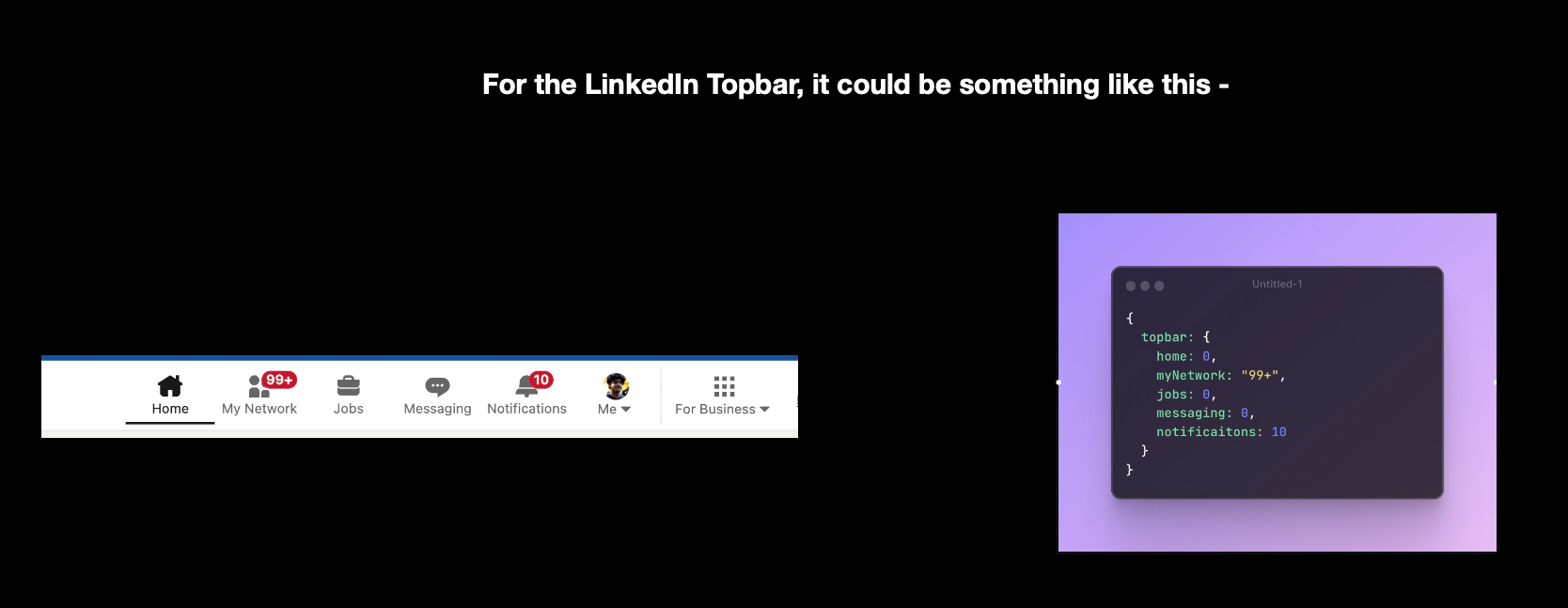
Creator of frontend framework realised that all websites can effectively be divided into two parts: State and Component
-
State is basically a javascript object that represent the current state of the app. It represents the dynamic things in your app (things that change). it allows components to create and manage their own data that influences how the component behaves and renders.
-
Components basically takes care of how a DOM element should render, given a state. It is a re-usable, dynamic, HTML snippet that changes given the state.
-
A state change triggers a re-render. A re-render represents the actual DOM being manipulated when the state changes.
-
This is not the correct way to send get request. because it will cause infinite re-render loop. For this purpose, useEffect come into the picture.
javascriptfunction App() { const [todos, setTodos] = useState([]); fetch("http://localhost:3000/todo") .then(async (res) => { const data = await res.json(); setTodos(data.todos); }); return ( <div> <CreateTodo/> <Todos todos ={todos} /> </div> ) } -
A re-render happen when
- A state variable that is being used inside a component changes
- A parent component re-render triggers all children re-rendering
-
memo can be used to skip re-rendering a component when its props are unchanged.
javascriptimport { useState } from "react" import { memo } from 'react'; function App() { const [firstTitle, setFirstTitle] = useState("my name is harkirat"); function changeTitle() { setFirstTitle("My name is " + Math.random()) } return ( <div> <button onClick={changeTitle}>Click me to change the title</button> <Header title={firstTitle} /> <br /> <Header title="My name is raman" /> <Header title="My name is raman" /> <Header title="My name is raman" /> <Header title="My name is raman" /> </div> ) } const Header = memo(function ({title}) { return <div> {title} </div> }) export default App
#Wrapper Components
-
Use Case: Let say you wanna make a pretty box in which you will put some components and use it at several places in your website. then you can make a wrapper component, under which you can put any text/component and it will wrapped inside that box.
javascriptfunction App() { return ( <div style={{display: "flex"}}> <Card> hi there </Card> <Card> <div> hello from the 2nd card </div> </Card> </div> ) } function Card({children}) { return <div style={{ border: "1px solid black", padding: 10, margin: 10 }}> {children} </div> } export default App
#Hooks in React
- Hooks are basically special functions that let you use React features like state and lifecycle methods
- Lifecycle methods are basically functions that allow you to run code at particular stages of a component’s existence (mounting, updating, unmounting). They were traditionally used in class components but can now be handled using hooks in functional components.
- Mounting means when a component is added to the DOM.
- Some common hooks are:
- useState
- useEffect
- useCallback
- useMemo
- useRef
- useContext
#useState
-
useStatelets a functional component remember values between renders. Withoutusestate, variables reset every time react renders. -
useStategives memory to functional components. -
let count = 0;resets on every render whileconst [count, setCount] = useState(0);persists between renders. -
setCount(prev ⇒ prev + 1);is safer to use thansetCount(prev + 1);when multiple updates happen quickly. State update is asynchronous. -
Hooks like
useState, useEffect,etc must be called:- At the top level of the component
- Not inside loop
- Not inside condition
- Not inside nested functions
Because it internally stores states like
javascriptState #1 - Count State #2 - user State #3 - loadingSo changing order breaks React memory mapping.
#React.memo
- memo lets you skip re-rendering a component when its props doesn’t change.
- Now react compiler automatically optimizes you React application by handling memoization for you, eliminating the need for manual
useMemo,useCallbackandReact.memo.
💡 Side effects: These are operations that interact with the world outside of a specific component's scope. . Because React components are designed to be "pure" functions—meaning they should only take props/state and return UI—anything that doesn't fit into this calculation is considered a side effect.
Example - Data fetching, Manual DOM manipulation.
#useEffect
-
It is used to perform side effects in a functional component.
javascriptimport { useState } from "react"; import { useEffect } from "react"; function App() { const [todos, setTodos] = useState([]) useEffect(() => { fetch("https://sum-server.100xdevs.com/todos") .then(async function(res) { const json = await res.json(); setTodos(json.todos); }) }, []) return <div> {todos.map(todo => <Todo key={todo.id} title={todo.title} description={todo.description} />)} </div> } function Todo({title, description}) { return <div> <h1> {title} </h1> <h4> {description} </h4> </div> } export default App;
#useMemo
-
It lets you cache the result of a calculation between re-renders.
-
It skips expensive re-calculations.
javascript// Basic Syntex const cachedValue = useMemo(calculatedValue, dependencies); // More detailed way const count = useMemo(()=>{ let finalCount = 0; for(let i = 0; i<= inputValue; i++){ finalCount = finalcount + i; } return finalCount; }, [inputValue]);💡 React Compiler automatically memoizes values and functions, reducing the need for manual
useMemocalls. You can use the compiler to handle memoization automatically.
#useCallback
-
It lets you cache a function definition between re-renders.
-
It is primarily used to optimize performance by ensuring a function maintains its referential integrity, meaning it doesn't change unless its dependencies do.
javascriptconst cachedFn = useCallback(fn, dependencies)💡 React Compiler automatically memoizes values and functions, reducing the need for manual
useCallbackcalls. You can use the compiler to handle memoization automatically.
#Custom Hooks
-
Custom hooks are the
hooksthat you create yourself, so other people can use them. -
A
custom hookis effectively a function, which uses another hook internally (useState, useEffect, another custom hook) and it always starts withuse -
A few good examples of custom hooks are —
- Data fetching hooks
- Browser functionality related hooks — useOnlineStatus, useWindowSize, useMousePosition
- Performance/Timer based - useInterval, useDebounce
-
Data fetching hooks are used to encapsulate all the logic to fetch the data from your backend.
javascriptimport { useEffect, useState } from 'react' import axios from 'axios' function useTodos() { const [loading, setLoading] = useState(true); const [todos, setTodos] = useState([]) useEffect(() => { axios.get("https://sum-server.100xdevs.com/todos") .then(res => { setTodos(res.data.todos); setLoading(false); }) }, []) return { todos: todos, loading: loading }; } function App() { const { todos, loading } = useTodos(); if (loading) { return <div> Loading... </div> } return ( <> {todos.map(todo => <Track todo={todo} />)} </> ) } function Track({ todo }) { return <div> {todo.title} <br /> {todo.description} </div> } export default App
#Routing using react-router-dom
-
Routing is the process of navigating between different components in a single page application without reloading the entire page.
javascriptimport { BrowserRouter, Routes, Route, Link } from 'react-router-dom'; function App() { return ( <BrowserRouter> <nav> <Link to="/">Home</Link> <Link to="/about">About</Link> </nav> <Routes> <Route path="/" element={<Home />} /> <Route path="/about" element={<About />} /> {/* Handle 404 - Not Found */} <Route path="*" element={<NotFound />} /> </Routes> </BrowserRouter> ); }
#Lazy Loading
-
Lazy lets you defer loading component’s code until it rendered for the first time.
-
It is a way to optimise the application.
-
By default, React bundles your entire application into a single JavaScript file. If a user visits your homepage, they still have to download the code for the settings page, dashboards, and heavy charts—even if they never look at them. This can make the initial page load slow.
-
React gives us two main tools to achieve this:
React.lazy()and the<Suspense>javascriptimport React, { lazy, Suspense } from 'react'; // Instead of a normal import, we load the component lazily const HeavyDashboard = lazy(() => import('./HeavyDashboard.js')); function App() { return ( <div> <h1>Welcome to My App</h1> {/* Suspense wraps the lazy component and provides a fallback */} <Suspense fallback={<div>Loading dashboard... 🔄</div>}> <HeavyDashboard /> </Suspense> </div> ); }
#Managing States in ReactJS
#Context API
- Context lets the parent component make some information available to any component in the tree below it—no matter how deep—without passing it explicitly through props.
- It basically help teleport the state variable to the children components without prop-drilling.
- Context API is not a optimal way to manage state. It is ofcourse a cleaner way to write the state variable but it also re-render the components which doesn’t use the particular state variable but comes under the tree.
- That’s why some smart people build tools like Recoil and Redux to manage the state in optimised way.